# Uncomment to install shapely
# !pip install shapely

from shapely import geometryShapely
shapely is a Python package for working with geometric shapes: points, lines, and polygons. It supports the same operations and spatial predicates you used in QGIS (buffering, unions, intersections), and in fact shares much of the same computational engine under the hood.
Its core functionality lives in the geometry module, which defines the Point, LineString, and Polygon classes.
Note
To learn what a package can do, refer to its documentation. The shapely docs have dedicated pages for each geometry type, listing all available attributes and methods.
Importing the module as a whole means we access its classes with dot notation: geometry.Point(), geometry.LineString(), etc.
Points
A Point represents a single location in space. You create one by passing x and y coordinates to the Point constructor.
A class is a blueprint that defines attributes (properties) and methods (actions) for its objects. You create an instance by calling the class with parentheses and any required parameters.
point_a = geometry.Point(0, 0)

print(point_a)
print(type(point_a))
point_a
POINT (0 0)
<class 'shapely.geometry.point.Point'>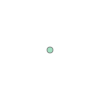
Tip
Placing a geometry variable on the last line of a notebook cell displays it visually.
point_a is now an instance of the Point class. Attributes are properties you access without parentheses:
print(point_a.x)
print(point_a.y)
0.0
0.0Methods perform actions and require parentheses. The distance() method takes another geometry as a parameter:
point_b = geometry.Point(3, 4)

distance = point_a.distance(point_b)
print(distance)
5.0
Note
You can also use Python’s built-in help() function to view documentation for any object: help(point_a).
LineStrings
A LineString represents a connected sequence of points. You can define one using a list of coordinate pairs:
line_1 = geometry.LineString([[0, 0], [1, 1], [2, 2]])

print(line_1)
print(type(line_1))
line_1
LINESTRING (0 0, 1 1, 2 2)
<class 'shapely.geometry.linestring.LineString'>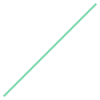
Or from existing Point objects:
point_c = geometry.Point(6, 0)
line_2 = geometry.LineString([point_a, point_b, point_c])

print(line_2)
line_2
LINESTRING (0 0, 3 4, 6 0)
The coords attribute returns the coordinates, which can be indexed:
print(list(line_1.coords))
print(line_1.coords[0])
print(line_1.coords[-1])
[(0.0, 0.0), (1.0, 1.0), (2.0, 2.0)]
(0.0, 0.0)
(2.0, 2.0)The length attribute returns the total length of the line:
print(line_1.length)
print(line_2.length)
2.8284271247461903
10.0Spatial predicates test geometric relationships. For example, within() and intersects() check whether a point lies on a line:
point_d = geometry.Point(1, 1)

print(point_d.within(line_1))
print(point_d.intersects(line_1))

print(point_d.within(line_2))
print(point_d.intersects(line_2))
True
True
False
FalseSpatial operations create new geometries. The buffer() method creates a Polygon representing a buffered region around the line:
buffered_line = line_2.buffer(0.5)

print(buffered_line)
print(type(buffered_line))
buffered_line
POLYGON ((2.6 4.3, 2.631140559839489 4.337554015535995, 2.6657927184274235 4.3718944647932645, 2.703626581870685 4.402694421399584, 2.7442819659553113 4.42966066501871, 2.7873718251557587 4.452536472853191, 2.832485937367983 4.471104063684996, 2.879194809287129 4.485186671186284, 2.9270537652500193 4.494650226762104, 2.9756071806160374 4.499404635904095, 3.0243928193839626 4.499404635904095, 3.0729462347499807 4.494650226762104, 3.120805190712871 4.485186671186284, 3.167514062632017 4.471104063684996, 3.2126281748442413 4.452536472853191, 3.2557180340446887 4.42966066501871, 3.296373418129315 4.402694421399584, 3.3342072815725765 4.3718944647932645, 3.368859440160511 4.337554015535995, 3.4 4.3, 6.4 0.3, 6.427479032767747 0.2593485618698348, 6.45084120876613 0.2161994553145178, 6.469861537469222 0.1709682298178777, 6.484356842714042 0.1240904868073501, 6.494187526787141 0.0760176845741075, 6.499258914826899 0.0272127904829227, 6.499522166594188 -0.0218541776566371, 6.494974746830583 -0.0707106781186548, 6.485660449674279 -0.1188861960960011, 6.471668976898605 -0.1659167750151374, 6.453135074034906 -0.2113494846915427, 6.430237232699422 -0.2547467832949877, 6.4031959716214475 -0.2956907311165449, 6.372271712927421 -0.3337870155564537, 6.337762274133484 -0.3686687485700105, 6.3 -0.4, 6.259348561869834 -0.427479032767747, 6.216199455314518 -0.4508412087661306, 6.170968229817878 -0.4698615374692223, 6.12409048680735 -0.4843568427140416, 6.076017684574107 -0.4941875267871413, 6.027212790482923 -0.4992589148268988, 5.978145822343363 -0.4995221665941884, 5.929289321881345 -0.4949747468305833, 5.8811138039039985 -0.4856604496742793, 5.834083224984862 -0.4716689768986044, 5.788650515308458 -0.4531350740349056, 5.745253216705012 -0.4302372326994219, 5.704309268883455 -0.4031959716214476, 5.666212984443546 -0.3722717129274205, 5.631331251429989 -0.3377622741334834, 5.6 -0.3, 3 3.166666666666667, 0.4 -0.3, 0.3686687485700106 -0.3377622741334832, 0.3337870155564537 -0.3722717129274204, 0.2956907311165449 -0.4031959716214476, 0.2547467832949878 -0.4302372326994219, 0.2113494846915427 -0.4531350740349056, 0.1659167750151375 -0.4716689768986044, 0.1188861960960013 -0.4856604496742792, 0.0707106781186548 -0.4949747468305832, 0.0218541776566371 -0.4995221665941884, -0.0272127904829226 -0.4992589148268988, -0.0760176845741073 -0.4941875267871413, -0.12409048680735 -0.4843568427140417, -0.1709682298178777 -0.4698615374692223, -0.2161994553145176 -0.4508412087661308, -0.2593485618698347 -0.427479032767747, -0.2999999999999999 -0.4000000000000001, -0.3377622741334832 -0.3686687485700106, -0.3722717129274204 -0.3337870155564537, -0.4031959716214475 -0.295690731116545, -0.4302372326994219 -0.2547467832949878, -0.4531350740349056 -0.2113494846915428, -0.4716689768986044 -0.1659167750151376, -0.4856604496742792 -0.1188861960960013, -0.4949747468305832 -0.0707106781186549, -0.4995221665941884 -0.0218541776566372, -0.4992589148268988 0.0272127904829227, -0.4941875267871413 0.0760176845741073, -0.4843568427140417 0.12409048680735, -0.4698615374692223 0.1709682298178776, -0.4508412087661308 0.2161994553145176, -0.427479032767747 0.2593485618698347, -0.4 0.3, 2.6 4.3))
<class 'shapely.geometry.polygon.Polygon'>
The buffer method accepts parameters that control the shape of the ends and corners:
buffered_line = line_2.buffer(0.5, cap_style='flat')

buffered_line
buffered_line = line_2.buffer(0.5, cap_style='square', join_style='mitre')

buffered_line
Polygons
A Polygon represents a closed shape with an interior area. It takes a list of coordinates defining its outer boundary:
poly = geometry.Polygon([[0, 0], [2, 0], [2, 2], [0, 2]])

print(poly)
print(type(poly))
poly
POLYGON ((0 0, 2 0, 2 2, 0 2, 0 0))
<class 'shapely.geometry.polygon.Polygon'>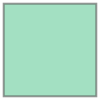
To add a hole, pass a second list of coordinates. The shell parameter takes a single list of coordinates; holes takes a list of lists (since there can be multiple holes):
poly_h = geometry.Polygon(
  shell=[[1, 0], [3, 0], [3, 2], [1, 2]],
  holes=[
    [[1.5, 0.5], [2.5, 0.5], [2.5, 1.5], [1.5, 1.5]]
  ]
)

poly_h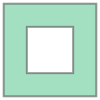
The area attribute returns the enclosed area. The length attribute returns the total boundary length (for polygons with holes, this includes both outer and inner boundaries):
print(poly.area)
print(poly.length)

print(poly_h.area)
print(poly_h.length)
4.0
8.0
3.0
12.0Predicates work on polygons too. contains() checks whether a point lies inside:
new_point = geometry.Point(1, 1)
print(poly.contains(new_point))TrueBuffering a polygon expands it outward:
buffered_polygon = poly.buffer(1)

print(buffered_polygon.area)
buffered_polygon
15.13654849054594
union() combines two geometries; difference() subtracts one from the other:
poly.union(poly_h)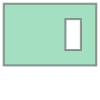
poly.difference(poly_h)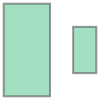
Putting It Together: A Building With a Courtyard
A quick example combining what we’ve covered: an L-shaped building with an interior courtyard, built with union and difference.
# two rectangular wings forming an L-shape
wing_south = geometry.Polygon([[0, 0], [10, 0], [10, 4], [0, 4]])
wing_east = geometry.Polygon([[6, 0], [10, 0], [10, 8], [6, 8]])

# merge the two wings
building = wing_south.union(wing_east)
building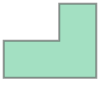
# cut out a courtyard
courtyard = geometry.Polygon([[7, 4.5], [9, 4.5], [9, 7], [7, 7]])
building_with_courtyard = building.difference(courtyard)
building_with_courtyard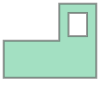
Two polygons, a union, and a difference, and we have a recognisable floor plan. The same operations scale to real building footprints, neighbourhood boundaries, and street networks.
Exercises
1. Compare Points
Create two points at (2,3) and (4,6). Check if they are equal.
NoteSolution
point_1 = geometry.Point(2, 3)
point_2 = geometry.Point(4, 6)

print(point_1.equals(point_2))False2. Distance Between Points
Create two points at (0,0) and (6,8). Compute and print the distance between them.
NoteSolution
point_3 = geometry.Point(0, 0)
point_4 = geometry.Point(6, 8)

distance = point_3.distance(point_4)
print(distance)10.03. LineString Coordinates
Create a LineString using the points (1,1), (3,4), and (5,2). Print the list of coordinates in the LineString.
NoteSolution
line_1 = geometry.LineString([[1, 1], [3, 4], [5, 2]])

print(list(line_1.coords))
line_1
[(1.0, 1.0), (3.0, 4.0), (5.0, 2.0)]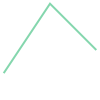
4. Length of a LineString
Create a LineString with the points (0,0), (3,4), and (6,8). Compute and print the length of the LineString.
NoteSolution
line_2 = geometry.LineString([[0, 0], [3, 4], [6, 8]])

print(line_2.length)
line_2
10.0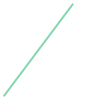
5. Point Lies on a Line
Create a point at (3,4) and a LineString from (0,0) to (6,8). Check if the point is on the line.
NoteSolution
point_5 = geometry.Point(3, 4)
line_3 = geometry.LineString([[0, 0], [6, 8]])

print(point_5.within(line_3))
print(point_5.intersects(line_3))
True
True6. Analyse a Polygon
Create a square Polygon with corners at (0,0), (4,0), (4,4), and (0,4). Print its area and perimeter.
NoteSolution
polygon_1 = geometry.Polygon([[0, 0], [4, 0], [4, 4], [0, 4]])

print(polygon_1.area)
print(polygon_1.length)
polygon_1
16.0
16.0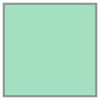
7. Point Inside a Polygon
Create a point at (2,2) and check if it is inside the square Polygon from the previous challenge.
NoteSolution
point_6 = geometry.Point(2, 2)

print(point_6.within(polygon_1))True8. Buffer Around a Point
Create a buffer of radius 2 around a point at (5,5). Print the resulting geometry type.
NoteSolution
buffered_point = geometry.Point(5, 5).buffer(2)

print(type(buffered_point))
buffered_point
<class 'shapely.geometry.polygon.Polygon'>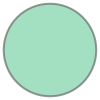
9. Buffer Around a LineString
Create a buffer of radius 1 around a LineString from (0,0) to (5,5). Print the area of the buffered region.
NoteSolution
buffered_line = geometry.LineString([[0, 0], [5, 5]]).buffer(1)

print(buffered_line.area)
buffered_line
17.278684114276892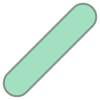
10. Union of Two Polygons
Create two overlapping squares: one from (0,0) to (4,4) and another from (2,2) to (6,6). Compute and print their union.
NoteSolution
polygon_2 = geometry.Polygon([[0, 0], [4, 0], [4, 4], [0, 4]])
polygon_3 = geometry.Polygon([[2, 2], [6, 2], [6, 6], [2, 6]])

union_polygon = polygon_2.union(polygon_3)

print(union_polygon)
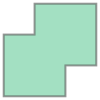
union_polygon
POLYGON ((4 0, 0 0, 0 4, 2 4, 2 6, 6 6, 6 2, 4 2, 4 0))