GIS Concepts
GIS (Geographic Information Systems) is how you work with spatial data at urban scale. It lets you represent neighbourhoods, buildings, and streets with attached data like population counts or building heights, then analyse and visualise that information.
If you’re coming from CAD, a few differences matter here:
- Scale: GIS handles city-wide and regional extents, which are difficult to manage with CAD files and formats
- Attributes: Every geometry carries data like population counts, building heights, and land use categories
- Ecosystem: Open data portals and open-source tools are widely available
File types
GIS uses two fundamental data types: vector and raster.
Vector data represents features as distinct shapes: points, lines, and polygons. Each shape can carry attribute information (a building polygon might have height, age, and land use fields). You’ll use vector data for most urban analysis: buildings, streets, parcels, administrative boundaries.
Raster data consists of a grid of pixels, where each cell holds a value. This works well for continuous phenomena: elevation, temperature, land cover, satellite imagery. Raster captures how values vary across space rather than defining discrete objects.
Vector
Vector data comes in three types: Points, Linestrings, and Polygons. Each has a multi-geometry version (MultiPoint, MultiLinestring, MultiPolygon) for grouping related features.
Points: Represent discrete locations, defined by coordinates (latitude/longitude or easting/northing). A point might mark a tree, a landmark, or a sensor. Attributes can store properties like tree species or sensor ID.
Linestrings: Connect points to form linear features like roads or rivers. Also called polylines. Attributes might include road type or river name.
Polygons: Closed shapes representing areas: city boundaries, land parcels, building footprints. Attributes can hold population counts, land use categories, or any other property.
Multi-geometry versions: Group related features that share attributes.
- MultiPoint: A cluster of trees, a set of sensors.
- MultiLinestring: Segments of a hiking trail or bus route.
- MultiPolygon: Buildings that together form a hospital or university campus.
Raster
Rasters are grids of pixels. Each cell holds a value representing something like surface temperature or land cover type. Unlike regular images (JPG, TIFF), geographic rasters include projection information that locates them on the Earth’s surface.
Resolution varies by purpose. A population density raster might use 1km² pixels; satellite imagery uses much finer resolution, with larger file sizes to match.
Common Formats
Prefer GeoPackage for vector data and GeoTIFF for raster. You’ll encounter other formats too; QGIS handles most of them.
ESRI Shapefile
Shapefile is a common vector geospatial file type in GIS software, requiring three mandatory files:
SHP(feature geometry)SHX(shape index position)DBF(attribute data)
Shapefiles often include a PRJ file for the coordinate reference system. The format is common but dated: multiple files per layer, one layer per bundle. This makes sharing and organisation awkward.
GeoPackage
GeoPackage is a newer format that solves the main annoyances of shapefiles: it stores multiple layers in a single file. Built on SQLite, so you can query it with SQL if needed.
GeoJSON
GeoJSON encodes vector data as JSON. Human-readable and easy to generate, so it’s common in web mapping and API responses.
GeoTIFF
GeoTIFF is the standard raster format. It embeds CRS information in a TIFF file, so the image knows where it belongs on Earth. Used for satellite imagery, elevation models, and land surface temperatures.
Coordinate Reference Systems
Coordinates need a reference system to mean anything. A Coordinate Reference System (CRS) defines how coordinates map to locations on Earth. There are two types: geographic and projected.
Geographic
Geographic CRS use latitude and longitude on a spherical or ellipsoidal model of Earth. Units are degrees. They work well for global or regional mapping, though it can add complication when you’re trying to work at more local scales, for example if you want to measure distance or area in metres.
Projected
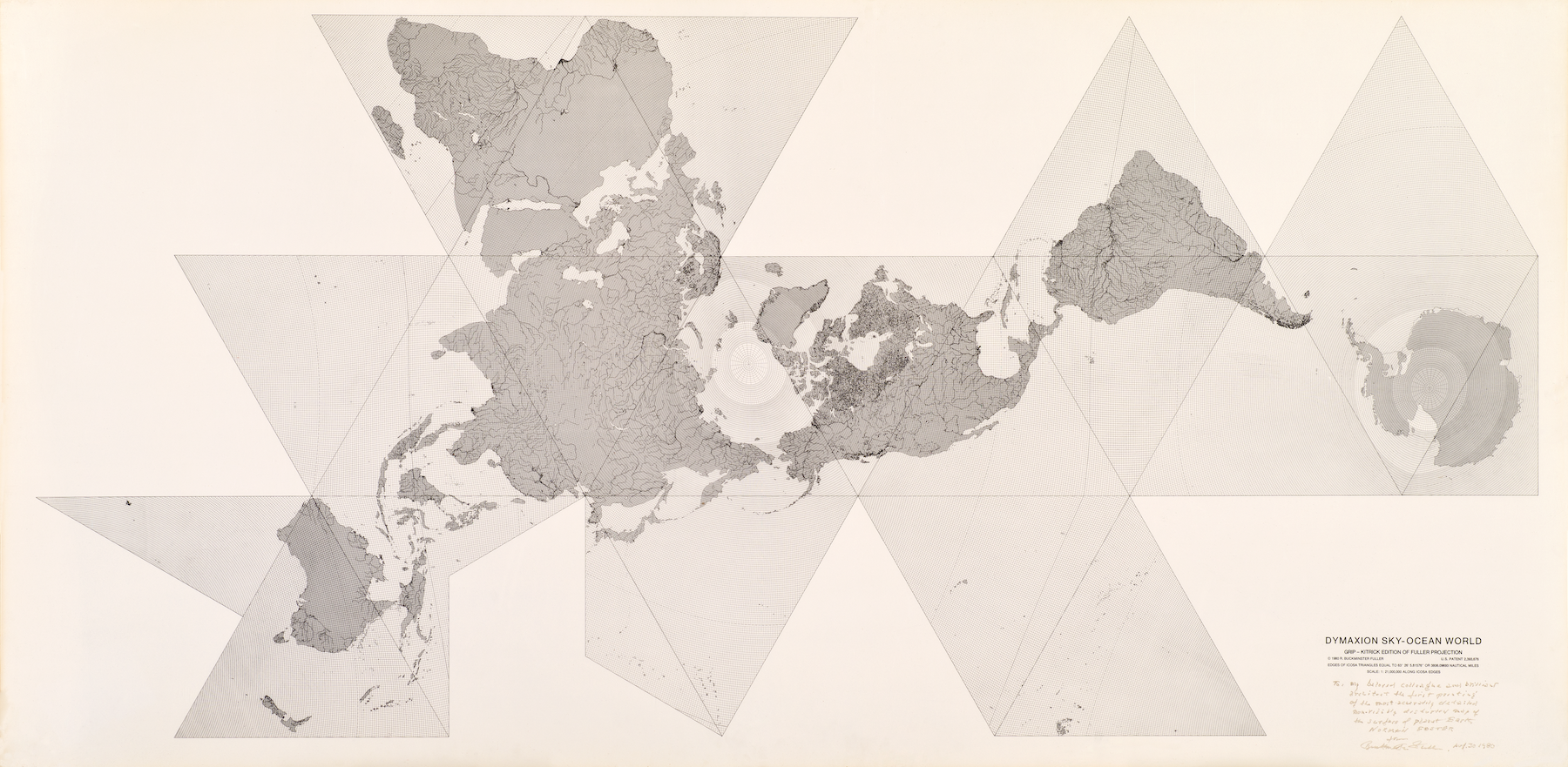
Projected CRS flatten Earth’s curved surface onto a 2D plane. Units are typically metres, making distance and area calculations straightforward. The trade-off: any projection distorts something. Different projections minimise different distortions:
- Equal-area: Preserves area (useful for density calculations)
- Conformal: Preserves angles and local shapes (useful for navigation)
- Equidistant: Preserves distances from a central point
Most countries have a standard projected CRS optimised for their region.
EPSG Codes
CRS are identified by EPSG codes. You can look them up at EPSG.io. Common ones you’ll encounter:
- WGS 84 (World Geodetic System 1984)
EPSG:4326: A widely used Geographic CRS for global mapping and GPS navigation. This is typically what GPS or longitudinal and latitudinal coordinates refer to. - Web Mercator
EPSG:3857: The standard for web maps (Google Maps, OpenStreetMap tiles). Distorts areas significantly, especially near the poles (Greenland looks huge). Fine for display, not for analysis. - LAEA Europe
EPSG:3035: Equal-area projection for Europe-wide analysis. Individual countries typically have their own local CRS too. - ETRS89 / UTM zone 30N
EPSG:25830: The standard projected CRS for Spain, including Madrid. Uses metres as units. This is the CRS you’ll use for most work in this course. - British National Grid
EPSG:27700: The standard for the UK.
Finding and Using GIS Data
Data Sources
Where you get data affects what you can do with it. Different sources have different coverage, accuracy, and constraints. When evaluating a dataset, consider who created it, why, and what that means for your analysis.
- Government Agencies: National agencies often provide official and reliable GIS data. However, these datasets may reflect governmental priorities, and some agencies are reluctant to make data openly available.
- International Organisations: Programmes like EU Copernicus and the Global Human Settlement Layer offer standardised datasets across countries. Useful for cross-city comparison, though often at coarser resolution than local sources.
- Local Authorities: City and regional councils create and maintain local GIS datasets, often through open data portals. Their local specificity is valuable but can make cross-city comparison difficult due to differing formats and definitions.
- Private Sector: Commercial providers generate and distribute curated data. These datasets are less likely to be openly available and may incur substantial cost.
- Open Data Platforms: Platforms such as OpenStreetMap offer freely accessible GIS data contributed by a community of users. These datasets may require additional validation for mission-critical purposes, but are extremely useful for generalisable workflows and often provide coverage where no other options exist.
- APIs and Web Scraping: Automated collection from online APIs or websites. Quality varies and these techniques require technical skills. Legal and ethical considerations are important: scraping may violate terms of service or data privacy laws.
Data Collection
Data can be purposely collected to address a specific research question, using structured approaches such as surveys, experiments, or observations. Purpose-built data is highly relevant but resource-intensive to create.
Alternatively, data originally collected for different purposes can be adapted to new research needs. This includes repurposing information from public databases, existing studies, or scraped sources (assuming ethical procedures were followed).
Attribution and Licenses
Attribution means giving proper credit to the original source or creator of the data, just as with citing sources in academic papers.
Licenses are legal agreements that determine how data can be used, distributed, or modified. Always check the license before using a dataset. Most open data licenses allow academic use with attribution. Avoid proprietary or restricted datasets unless you have explicit permission; they may limit how you can share or publish your work. Common licenses for GIS data:
- Creative Commons (CC): A family of licenses with varying permissions. CC-BY requires attribution. CC-BY-SA requires derivative works use the same license. CC0 is public domain.
- Open Government Licenses: Adopted by many governments to permit reuse of public sector data. Terms vary by country.
- ODbL (Open Database License): Used by OpenStreetMap. Allows free use with attribution and share-alike requirements.
When you download a dataset, record the source URL, download date, license, and any required attribution text. You’ll need this information for any published work.
Privacy
Avoid data containing personally identifiable or sensitive information. Even anonymised datasets can carry re-identification risks, and handling them properly requires ethical review, security protocols, and legal compliance.
If your project requires individual-level or sensitive data, get written faculty approval first. You’ll need to demonstrate appropriate safeguards, and the data cannot leave secure environments.
A Note on Aggregation
Most urban data you’ll encounter is aggregated: individual records grouped into neighbourhoods, postcodes, or census tracts. This aggregation protects privacy and makes data manageable, but it also means you’re working with averages and totals rather than individual observations.
How data is grouped affects what conclusions you can draw from it. The same underlying data, aggregated differently, can suggest different patterns. We’ll return to this in Lesson 3 when we cover the Modifiable Areal Unit Problem (MAUP) and ecological fallacy. For now, be aware that the boundaries on a map aren’t neutral. They shape what the data appears to show.
Challenge
A colleague sends you a dataset of Madrid building footprints. The files are: buildings.shp, buildings.shx, buildings.dbf, and buildings.prj.
- What file format is this?
- Why are there four files instead of one?
- If you wanted to share this with someone else, what would you need to send them?
- What format would be simpler for this purpose?
- This is an ESRI Shapefile.
- Shapefiles split information across multiple files:
.shpcontains the geometry,.shxis a spatial index,.dbfholds the attribute table, and.prjdefines the coordinate reference system. - You’d need to send all four files together. If any are missing, the recipient won’t be able to use the data properly.
- GeoPackage (
.gpkg) stores everything in a single file and can hold multiple layers. It’s the better choice for sharing.
Assignment: Data Catalogue
Start a collaborative spreadsheet and collectively find and document potential GIS datasets for this year’s three pilot cities. For each dataset, record:
- Dataset name and description: What does it contain?
- Source: Where did you find it? (include URL)
- Format: What file format is the data in?
- License: What license applies? Can you use it for academic work?
- CRS: If stated, what coordinate reference system does the data use?
Good places to start looking:
- The city’s open data portal (search “[city name] open data”)
- OpenStreetMap (via Overpass Turbo or Geofabrik downloads)
- National mapping or statistics agencies
Keep this catalogue. You’ll add to it throughout the course as you discover useful data sources.
Dataset: Barcelona Building Footprints
Source: Barcelona Open Data Portal https://opendata-ajuntament.barcelona.cat/
Format: GeoJSON, also available as Shapefile
License: CC-BY 4.0 (attribution required)
CRS: EPSG:25831 (ETRS89 / UTM zone 31N)
Notes: Updated quarterly. Includes building height and construction year attributes.